
Quick Answer: To advertise on ChatGPT, sign up at ads.openai.com, verify your business and add billing. Then build a campaign, ad group and ad inside OpenAI Ads Manager. Pick an objective, set a daily budget (minimum ₹725 in India), write context hints, install the conversion pixel and submit for review.
You can advertise on ChatGPT today through OpenAI’s self-serve ChatGPT Ads Manager. This guide walks through every screen, from account setup to launch, using a real ChatGPT ads campaign built for an Indian ecommerce store.
Key Takeaways
- ChatGPT Ads Manager is OpenAI’s self-serve platform for buying ads inside ChatGPT.
- Every campaign has three levels: campaign, ad group and ad.
- Context hints replace keywords. You describe conversations, not search terms.
- The Conversions objective needs a pixel and a conversion event such as Purchase.
- Nothing serves until billing, verification and a logo are complete.
- Allow OAI-AdsBot in robots.txt, or your ads can be rejected.
What Are ChatGPT Ads and How Do They Work?
ChatGPT ads are sponsored cards that appear inside ChatGPT conversations. They are labelled “Ad” and kept separate from the AI’s answers. In India, ads are shown to logged-in users aged 18 and above on the Free and Go plans.
OpenAI Ads Manager is the web platform where you create, launch and measure these ads. It is still labelled Beta.
Are ChatGPT Ads Available in India? (November 2026 Update)
On October 21, 2026, OpenAI expanded ChatGPT Ads to 26 more countries, bringing the total to 89. India was already live. Self-serve ChatGPT ads in India opened in early September 2026, with a minimum daily budget of ₹725.
Availability changes often. Check the availability page in the OpenAI help center before you plan a campaign.
What Do You Need Before Creating a ChatGPT Ads Campaign?
Get these ready first to avoid a stalled launch:
- An OpenAI account on a work email
- A legal business entity in a supported country
- A credit or debit card for billing
- A square brand logo and your brand name
- A landing page that allows OAI-AdsBot to crawl it
- Access to add the OpenAI Pixel to your website
One rule matters for agencies. The client must own the ad account, then invite the agency as an admin or member.
Step 1: How to Set Up Your OpenAI Ads Manager Account
Go to ads.openai.com and sign up. Add your business name, website, industry, country, currency and time zone. Country, currency and time zone cannot be changed later, so choose carefully.
Complete identity verification, then open Settings and add your account name and logo. Finally, set up billing. ChatGPT Ads uses postpay billing, so you are charged after delivery once unpaid spend reaches a threshold set for your account.
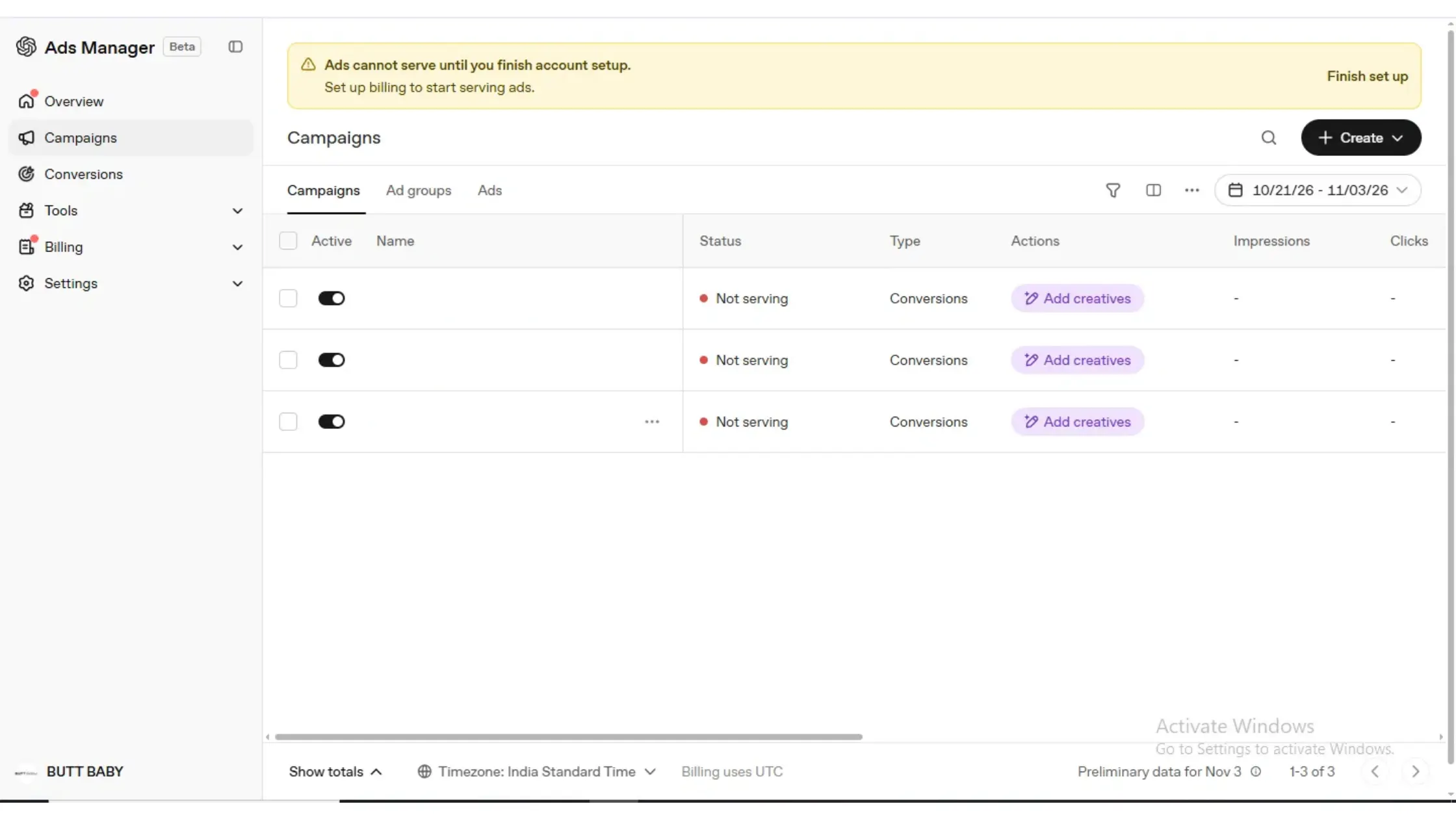
Until you finish setup, every campaign shows “Not serving.” That banner is your signal to complete billing first.
Step 2: How to Create a ChatGPT Ads Campaign
Click Create > Create campaign. The campaign holds your objective, budget, locations and platforms.
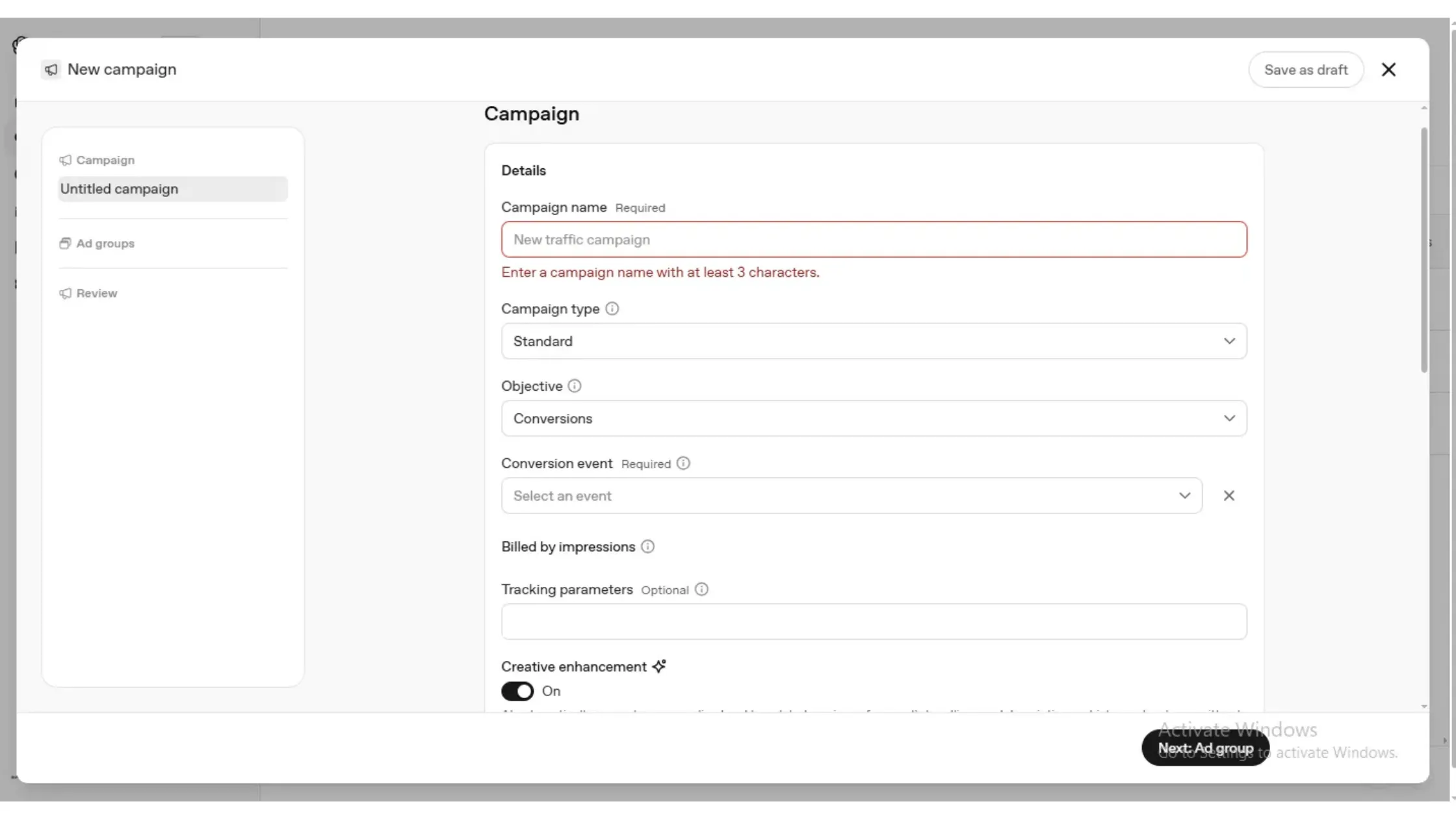
Fill in these fields:
- Campaign name: Use a clear format like product_objective_month. The form needs at least three characters.
- Campaign type: Choose Standard for chat-card ads. Choose Product feed only if you upload a catalog.
- Objective: You can pick Reach (CPM), Clicks (CPC) or Conversions. Online stores should pick Conversions.
- Conversion event: Choose the action you want, such as Purchase. This field is required for Conversions campaigns.
With the Conversions objective, the form shows “Billed by impressions.” You pay per thousand impressions while OpenAI optimizes toward your chosen event.
Next, set your daily budget, locations and eligible platforms. These are Android app, Android web, Desktop web, iOS app and iOS web. Objective and budget type lock after you create the campaign.
Tracking Parameters and Creative Enhancement
Add UTM tags in the campaign’s tracking parameters. A common setup is utm_source=chatgpt_ads&utm_campaign={campaign_id}. Macros such as {campaign_id}, {ad_group_id} and {ad_id} fill in automatically.
Check the Creative enhancement toggle (called text customization in some guides). It is on by default. AI creates personalized and translated versions of your headlines and descriptions, and these may be shown without your individual review. Turn it off if your brand needs to approve every variant.
Step 3: How to Set Up an Ad Group, Autobid and Context Hints
An ad group is a theme or intent cluster. It holds your bid strategy, context hints and destination URL.
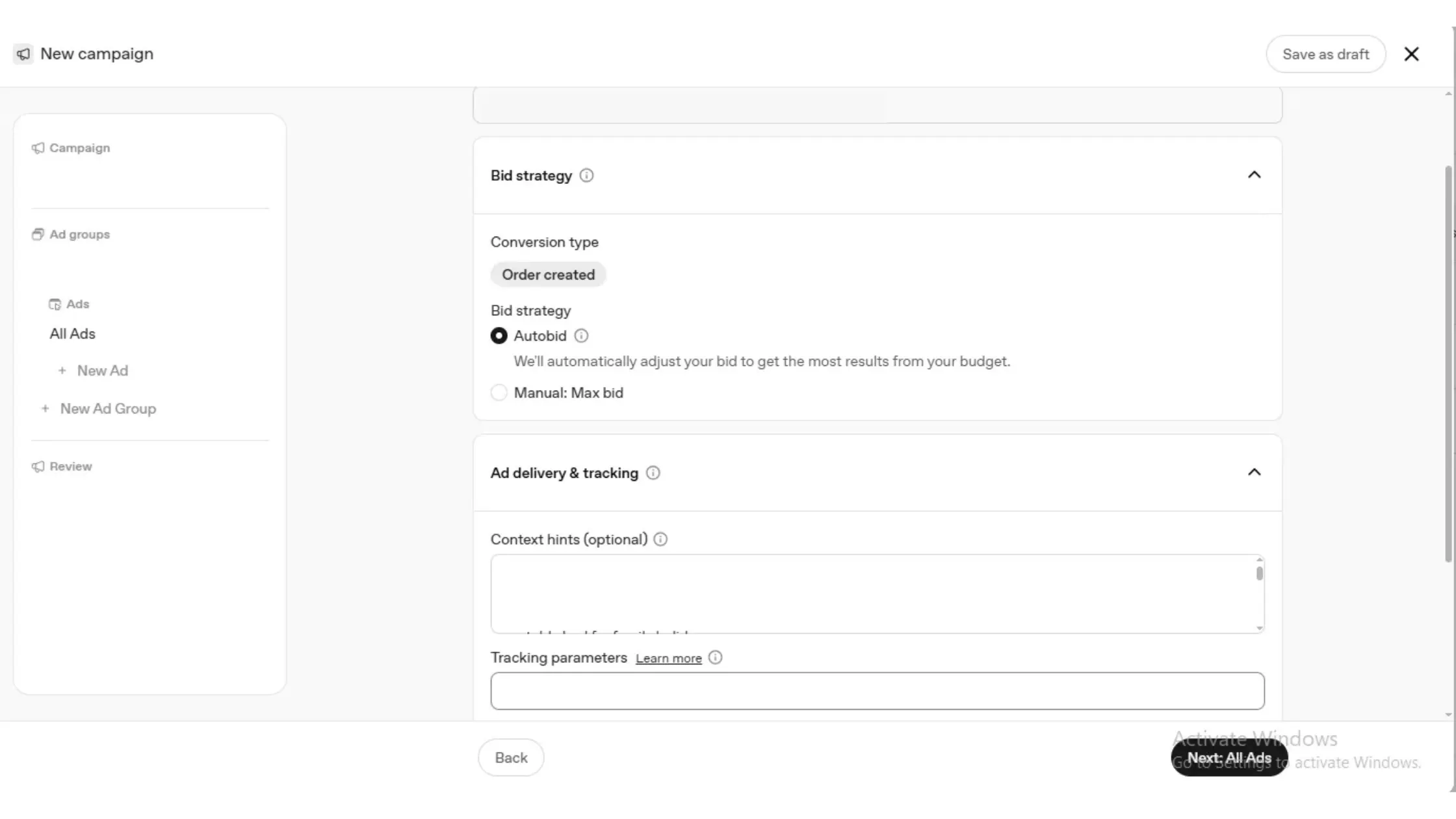
Choose a Bid Strategy
- Autobid: OpenAI adjusts bids automatically to get the most results from your budget. Start here.
- Manual: Max bid: You cap the bid yourself.
The conversion type shows the event you chose earlier, for example “Order created.”
Write Context Hints, Not Keywords
Context hints are short descriptions of the conversations where your ad belongs. They are not exact-match keywords and do not guarantee placement.
Weak hint: travel bed
Strong hint: portable inflatable bed for toddlers during family hotel stays
Write each hint as a real situation. Describe the product, who it helps and when it is useful. Mix product terms, use cases and buyer scenarios.
Set the Destination URL and Ad Group Tracking
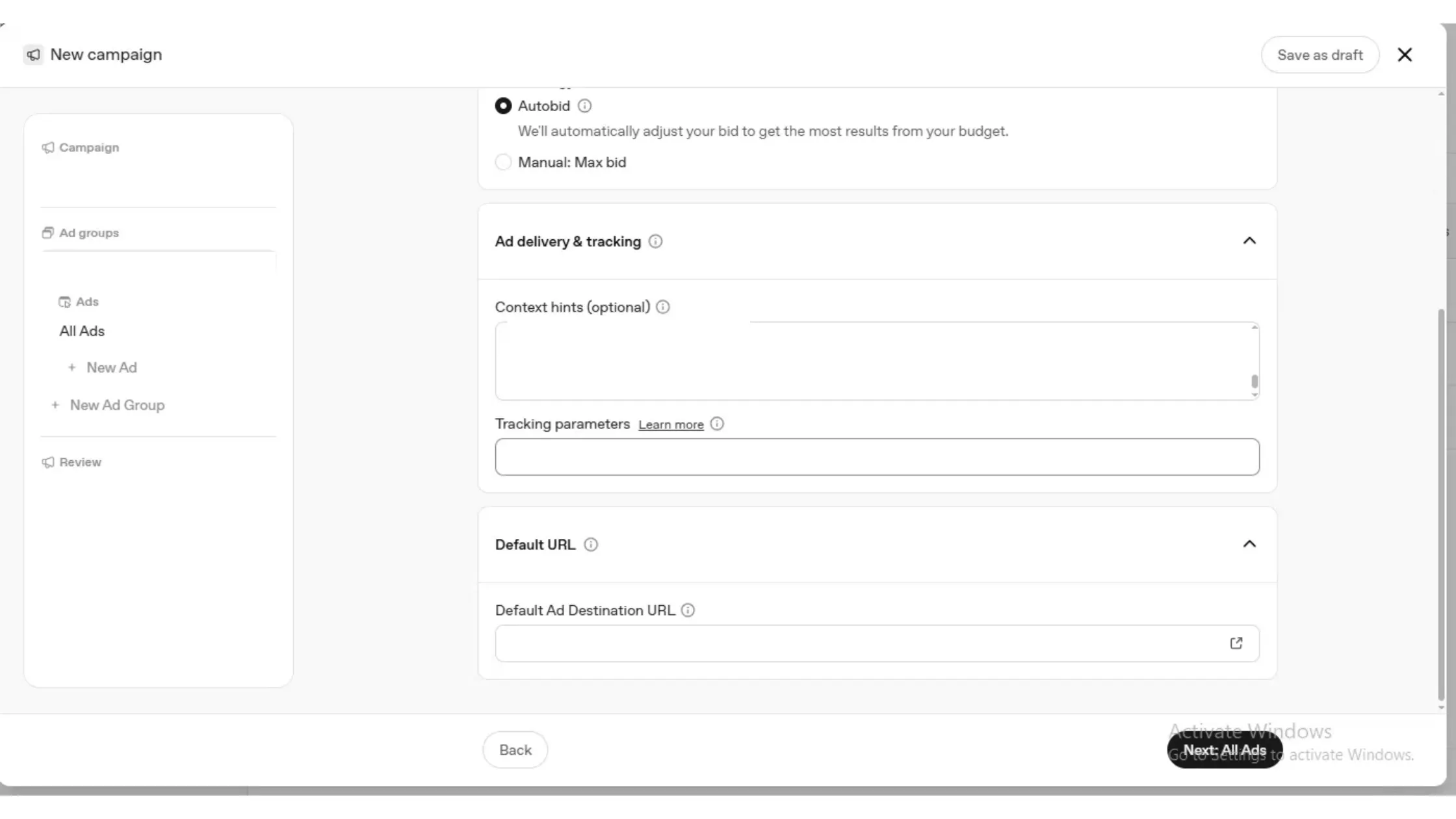
Add ad-group UTM tags so you can separate traffic in analytics:
utm_source=chatgpt&utm_medium=paid&utm_campaign=your_campaign&utm_content=your_ad_group
Then set the Default Ad Destination URL. Send people to the most relevant collection or product page, not your homepage.
Step 4: How to Write a ChatGPT Ad That Gets Approved
Open the ad group and click New Ad. A ChatGPT ad has four parts:
- A title of up to 50 characters
- A description of up to 100 characters
- One square image (PNG or JPG, up to 1200 x 1200 pixels)
- A landing page URL
Put your hook in the first 35 characters, because previews truncate the title. Write like a helpful recommendation, not a banner. Add three to five ad variations per ad group so you can compare results.
Step 5: How to Set Up ChatGPT Ads Conversion Tracking
Go to Tools > Conversions and create a data source. OpenAI gives you a Pixel ID and a script to place in your site’s head section. You can also send events through the Conversions API.
For ecommerce, track these standard events:
- page_viewed
- items_added
- checkout_started
- order_created
Without the pixel, a Conversions campaign has nothing to optimize toward. If you use both the pixel and the API, share an event ID so OpenAI counts each action once.
Also add these lines to your robots.txt so ad review can crawl your page:
User-agent: OAI-AdsBot
Allow: /
Step 6: How to Review and Launch Your ChatGPT Ad Campaign
The review step lists your campaign type, objective, billing method, locations, platforms, daily budget, tracking, ad group and ad. Check each line, then submit.
Set the campaign, ad group and ad to Active. Ads show “Serving” once review passes.
Why Is My ChatGPT Ad Not Serving? (Quick Fixes)
Hover over the status to see the reason.
Reason | Fix |
Billing not set up | Add a billing profile and card |
Verification incomplete | Finish verification, add name and logo |
No active creatives | Add an ad and set every level to Active |
Ad disapproved | Check the policy code and allow OAI-AdsBot |
Budget below bid | Raise the budget or lower the bid |
ChatGPT Ads Best Practices for Better Results
- Give the campaign about 30 days before judging it.
- Keep one theme per ad group so context hints stay tight.
- Wait 24 to 48 hours for conversion data. Reporting lags delivery.
- Compare ChatGPT traffic in analytics using your UTM tags.
Final Thoughts: Is Advertising on ChatGPT Worth It?
ChatGPT ads are worth a controlled test, especially in India, where the entry point is a ₹725 daily budget. The platform is still in beta. It has no video ads, no dayparting, no frequency caps, no keyword or demographic targeting and no prompt-level reporting, so you have less control than on Google or Meta.
The best way to start is simple. Pick one product, build one campaign with the Conversions objective, write specific context hints, install the pixel and run it for 30 days. Then compare cost per order against your other channels.
If you follow the six steps in this ChatGPT Ads Manager guide, you will launch with the right setup instead of debugging a “Not serving” campaign. Start small, track everything with UTM tags and scale only what converts.
